
You’re not behind on social media because you don’t care. You’re behind because running a business already consumes every hour you have — and social media keeps demanding more.
Here’s what the numbers confirm: small business owners and solopreneurs report spending 5 to 10 hours every single week on social media tasks alone. Not strategy. Not growth. Tasks — scheduling posts, resizing images, copy-pasting captions, hunting for hashtags. That’s time pulled directly away from client work, product development, and the kind of deep thinking that actually moves the needle.
The good news? In 2026, you can automate social media scheduling for small business in a way that’s genuinely set-and-run — not just “schedule a few posts and hope.” We’re talking about AI-powered content workflows that research your niche, draft platform-specific captions, queue a full month of content, and publish across 10+ channels automatically.
This guide is your step-by-step playbook. You’ll learn:
- How to build a social media automation workflow from scratch — even without a tech background
- Which AI tools handle content research, drafting, and scheduling so you stop doing it manually
- How to use Metricool to schedule, analyze, and run your social presence from one clean dashboard
- How to wire your tools together with Make.com for a near-fully autonomous publishing pipeline
And critically — you’ll learn how to do all of this without your brand voice becoming robotic AI noise.
Pro-Tip: Before you touch a single scheduling tool, spend 30 minutes writing a 200-word Brand Voice Document: your tone, three phrases you’d never say, and two example posts you love. Paste this as a system prompt in every AI drafting tool you use. It’s the single highest-ROI step most small business owners skip — and it’s the difference between content that sounds like you and content that sounds like everyone else.
If you’ve been wondering how to build a self-running marketing engine (LINK TO BE ADDED) that stops depending on your daily attention, this is exactly where that system starts.
Table of Contents
What Does It Mean to Automate Social Media Scheduling?
Automating social media scheduling for your small business means using AI-powered tools and workflow logic to plan, generate, approve, and publish content across platforms on a set schedule — with minimal manual work on your end. It’s not just queuing a few posts in Buffer the night before. It’s building a system where the heavy lifting happens without you.
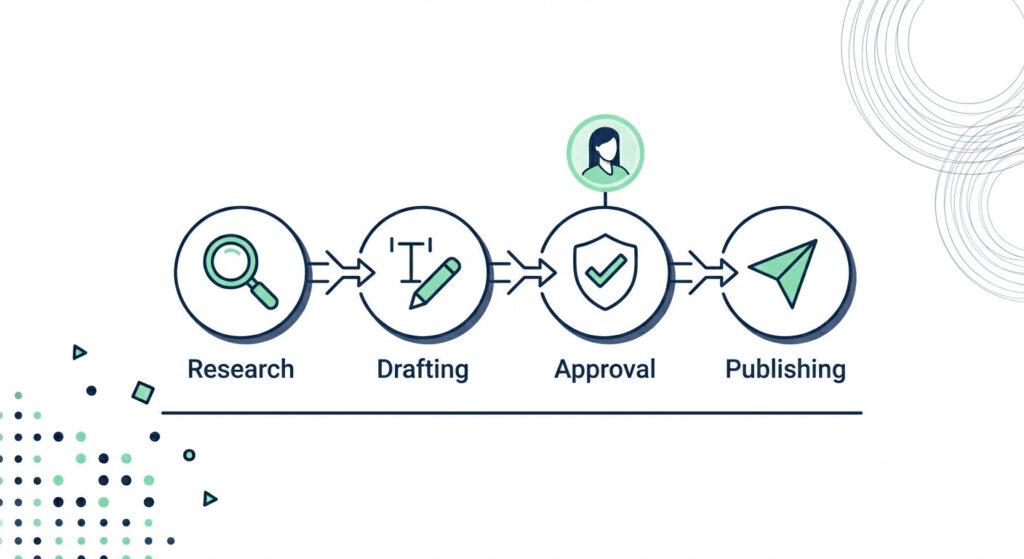
Think of it as four connected layers working in sequence:
- Research — AI tools surface trending topics, niche conversations, and content gaps in your industry automatically
- Drafting — a large language model (like GPT-5 or Claude) turns those inputs into platform-specific captions, hooks, and hashtags
- Approval — you review a clean draft in your scheduling dashboard before anything goes live
- Publishing — your scheduler (Metricool, Buffer, or a Make.com-connected pipeline) posts to every platform at the optimal time
That four-stage loop is the architecture behind a self-running marketing engine (LINK TO BE ADDED) — and once it’s set up, it runs whether you’re with a client, on a flight, or asleep.
Simple Scheduling vs. Full AI Pipeline
Not all automation is the same, and it’s worth knowing where you’re starting before you build.
| Manual Workflow | Automated Workflow | |
|---|---|---|
| Time cost per week | 5–10 hours | 30–60 minutes (review only) |
| Consistency | Breaks when you’re busy | Runs on schedule regardless |
| Error rate | High (missed posts, wrong formats) | Low (templated, rules-based) |
| Scalability | Hits a ceiling fast | Scales across 10+ platforms without extra effort |
| Brand voice risk | Low (you write everything) | Medium — mitigated by Human-in-the-Loop review |
A simple scheduling tool like Metricool or Buffer handles the publishing layer. A full AI agent pipeline — using Make.com connected to an LLM via HTTP modules — handles everything from research to drafts, feeding content directly into your scheduler for final approval.
Start with the scheduler. Add the AI pipeline when you’re ready.
The Human-in-the-Loop Rule (Non-Negotiable)
Here’s the mistake most small business owners make: they build the automation, turn it all the way up, and skip the review step. Then their brand starts sounding like a corporate chatbot.
Human-in-the-Loop (HITL) is the approval gate you build between AI drafting and publishing. It’s not a sign of a broken system — it’s the safeguard that keeps your automation from eroding your brand’s authenticity. In practice, this looks like a Google Sheets review tab, a Telegram approval bot, or simply a “Scheduled (Pending)” queue inside Metricool that you scan for 10 minutes each Monday morning.
The goal is to automate workflows, not relationships — and HITL is exactly where that principle lives in your system.
Pro-Tip: When setting up your HITL review queue, add a “Rejection Reason” column to your draft spreadsheet or scheduling dashboard. Every time you edit or reject an AI-generated post, log a one-line reason. After 30 days, feed those rejection notes back into your LLM system prompt as “Brand Voice Don’ts.” Your AI drafts will sharpen dramatically — with zero extra tool setup required.
Why Small Business Owners Can’t Afford NOT to Automate in 2026
In 2026, AI is no longer a differentiator in social media management — it is the baseline expectation. Small businesses that don’t build social media automation workflows will simply be outpublished, outranked, and out-engaged by competitors who produce more content, more consistently, with far less effort.
That gap is already measurable. Small businesses using automation save an average of 4.7 hours per week and increase their posting consistency by 40% — which correlates directly with 2.3x higher engagement per post. Meanwhile, accounts with inconsistent posting schedules see 61% less engagement per post than those on a regular cadence.
This isn’t optional anymore. Let’s talk about why.
The Consistency-Algorithm Feedback Loop
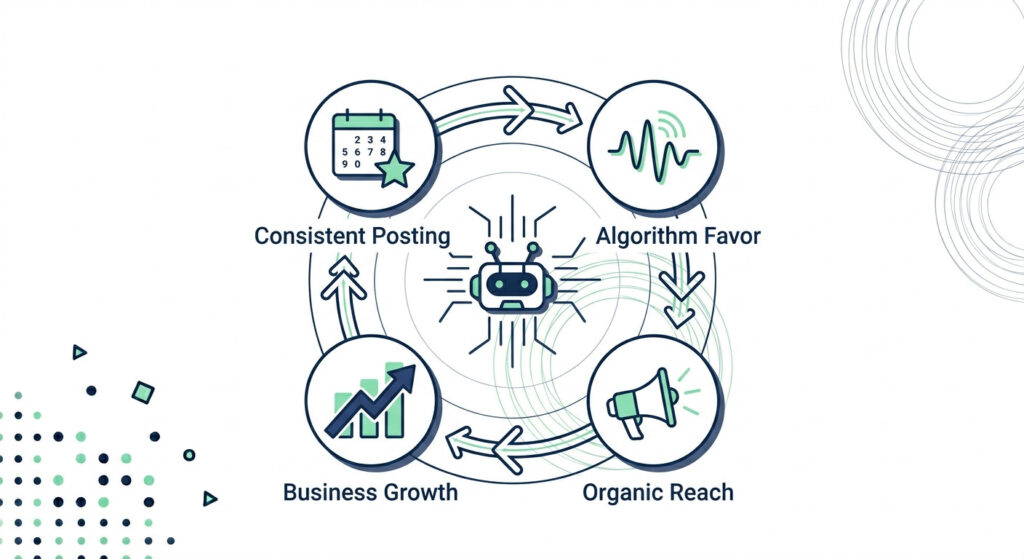
Every major platform in 2026 — Instagram, LinkedIn, TikTok, Facebook — runs on a discovery-first algorithm that rewards predictability. Post at a regular cadence and the platform’s AI starts building a reliable “content profile” for your account. That profile determines how widely your posts get distributed — including to non-followers.
Miss that cadence, and the penalty compounds. According to Hootsuite’s 2025 consistency analysis, each gap in posting reduces baseline reach for subsequent posts by 8–12% — and you need 3–4 weeks of recovery posting just to get back to where you were.
The fix isn’t working harder. It’s building an AI content scheduling system that keeps the calendar full even when you’re heads-down on client work.
What You Actually Save (The Numbers)
| Manual Workflow | With AI Content Automation | |
|---|---|---|
| Time spent per week | 6–10 hours | 30–60 minutes (review only) |
| Posts published per month | 8–12 (sporadic) | 30–60 (consistent, multi-platform) |
| Cost vs. hiring a social media manager | $3,500–$5,000/month | $110–$280/month in tool costs |
That last row is the one most small business owners don’t stop to calculate. A human social media manager for a small business runs $3,500–$5,000 a month. An AI-powered stack handling the same volume — AI content agent for drafting, autonomous posting agent for scheduling, and a no-code orchestrator like Make.com as the glue — costs a fraction of that.
And unlike a hire, it doesn’t take holidays.
What AI Agents Can Actually Do Right Now
Modern AI content agents — not just schedulers — can research your niche, generate 30 days of platform-specific posts across Instagram, LinkedIn, TikTok, Facebook, and X, and queue them with minimal supervision. The first-draft generation alone cuts writing time by 60–70%.
Small businesses using AI agents are reporting 40% efficiency gains and 30% cost reductions within their first year of implementation. That’s not a projection — that’s the current benchmark.
If you want to understand the full stack of AI tools for workflow automation that power this kind of system, that’s worth reading before you start building. The tools have matured significantly, and the barrier to entry for a solopreneur is lower than it’s ever been.
Pro-Tip: Before building your automation stack, run a one-week “time audit.” Use a free time tracker like Toggl to log every minute you spend on social media tasks — writing, resizing, scheduling, responding. At the end of the week, multiply that number by your hourly rate. That single calculation will give you the clearest possible ROI case for automation — and the motivation to actually finish building it.
How to Build Your Social Media Automation Workflow (Step-by-Step)
A small business social media automation workflow has four stages: AI-powered research and ideation, multi-variant content drafting, human review and approval, and automated scheduling and publishing via a connected tool like Metricool or Make.com. Each stage has a specific job — and together, they replace the manual grind entirely.
Here’s the full architecture, broken down so you can start building this weekend.
Your four-stage pipeline at a glance:
- Research — an AI trend agent surfaces niche-relevant topics daily and outputs a structured briefing document
- Draft — a large language model turns that briefing into platform-specific caption variants, adjusted for tone and character limits
- Review — you spend 10–15 minutes approving or editing in your scheduling dashboard (never skip this)
- Publish — Metricool or a Make.com automation scenario pushes approved posts live across every channel on schedule
Pro-Tip: Don’t build all four stages at once. Start with Stage 4 — just get Metricool connected and start scheduling manually. Once you’re consistent, layer in AI drafting (Stage 2), then the research layer (Stage 1). Building in reverse order means you always have a working system, never a half-built one that stalls.
Stage 1 — AI Ideation and Content Research
AI ideation tools analyze platform signals, niche community conversations, and search trends to surface content ideas that human research regularly misses — giving your small business a consistent, never-stale pipeline of relevant topics.
The fastest research setup for a solopreneur uses the Perplexity Search API to pull real-time, web-grounded trending topics from your niche — without hallucination risk — then routes those results into a Google Sheet as your working Briefing Document. You can also add a Reddit or X (Twitter) account scraper via Make.com or n8n to capture raw community language: the exact words your ICP uses when describing their problems.
The output to aim for is a structured weekly Briefing Doc with columns for: Topic, Platform Fit, Trending Signal Score, and Angle. Then instruct your LLM to generate an entire 30-day content batch from that single doc — not one post at a time. Batch generation is the difference between a workflow that saves you three hours and one that saves you thirty.
One non-negotiable: always filter every AI-surfaced topic through your ICP profile before drafting. Trending ≠ relevant. A viral trend in your niche only performs if it speaks directly to the person you’re trying to reach.
Recommended tools for this stage:
- Perplexity Agent API — real-time web research with multi-step orchestration
- n8n or Make.com — scrape Reddit/X community signals and route to Google Sheets
- Airtable or Notion — as your Briefing Doc database if you prefer visual organization
Stage 2 — AI Drafting and Caption Generation
AI drafting tools generate multiple tone-adjusted captions, hashtags, and CTA variants instantly — tailored for platform-specific character limits — replacing hours of copywriting with a single structured prompt.
The most important thing you can do before running any caption prompt is load your Brand Voice Document as the system prompt. Every LLM call — whether it’s Claude 4.5 for a LinkedIn thought leadership post or GPT-5 for a punchy TikTok hook — needs to start with who you are before it drafts anything. Without that context, you get competent but generic copy that sounds like every other AI account in your feed.
Platform tone is not optional to customize — it’s mandatory. Here’s the baseline:
| Platform | Character Limit | Tone Guideline |
|---|---|---|
| 3,000 (posts) | Professional, evidence-backed, narrative-driven | |
| 2,200 (captions) | Storytelling, authentic, visuals-first | |
| TikTok | 2,200 (captions) | Hook-led, punchy, casual — first line is everything |
| 63,206 (posts) | Conversational, community-focused, shareable | |
| X / Twitter | 280 characters | Contrarian openers, threads, provocation |
| Google Business Profile | 1,500 characters | Local, service-specific, keyword-anchored |
Generate a minimum of three caption variants per post, not one. Over time, your Metricool analytics will reveal which variant style — storytelling vs. data-led vs. question-hook — consistently out-performs for your specific audience. That’s a feedback loop you can fold back into your LLM prompts every 30 days.
Recommended tools for this stage:
- Claude 4.5 — preferred for LinkedIn long-form and nuanced brand voice matching
- GPT-5 — preferred for short-form hooks, TikTok scripts, and rapid iteration
- Ocoya — if you want AI drafting, scheduling, and hashtag generation in one integrated workspace
Stage 3 — Scheduling and Publishing with Metricool
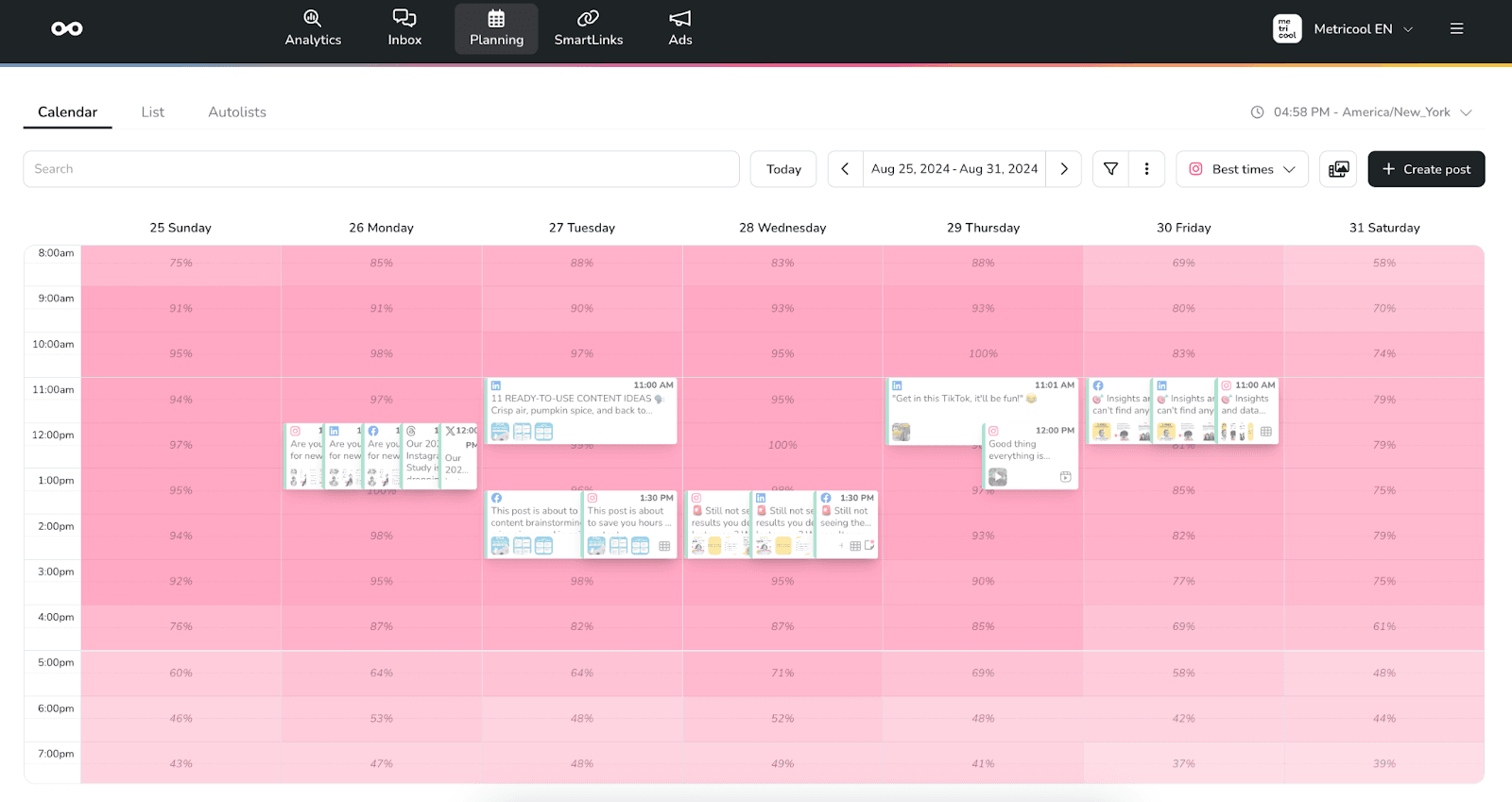
Metricool is an all-in-one social media scheduling and analytics platform that lets small businesses schedule posts across 10+ platforms, analyze competitor performance, and access a built-in AI assistant — all from one dashboard.
It’s the scheduling layer that anchors this entire workflow. Once your AI-drafted posts pass your HITL review, they land directly into Metricool’s visual content planner — where you can drag, drop, and redistribute across your calendar in minutes.
Here’s what Metricool gives you at every plan level:
| Feature | Benefit for Small Business | Free Plan | Paid Plan |
|---|---|---|---|
| Schedule across Instagram, Facebook, TikTok, LinkedIn, Pinterest, YouTube & Google Business Profile | One dashboard, every channel | ✅ | ✅ |
| Drag-and-drop visual content planner with best-time recommendations | No more guessing when to post | ✅ | ✅ |
| Competitor profile tracking | Monitor up to 100 rivals’ posting cadence and engagement | 5 profiles | Up to 100 |
| Canva + Adobe Express integration | Design-to-schedule without leaving the dashboard | ✅ | ✅ |
| REST API access | Connect Metricool directly into your Make.com automation scenario | ❌ | ✅ |
| Built-in AI caption assistant | Brainstorm captions without switching tools | 5 credits/mo | From 20 credits/mo |
| Analytics history | Track performance trends and posting ROI | 30 days | Unlimited |
Metricool’s free plan is genuinely useful as a starting point — 1 brand, 50 posts/month, and real analytics access with no credit card required. It’s rated 4.5/5 on G2 and 4.2/5 on Trustpilot, with users consistently praising the analytics depth relative to price point.
When you’re ready to connect Metricool into a full automation pipeline — where Make.com pushes AI-approved drafts directly into your scheduler via webhook — the REST API on paid plans makes that integration clean and reliable.
→ Start Scheduling Free with Metricool
Advanced Automation: Connecting Your Stack with Make.com
Make.com acts as the automation glue that connects your AI content tools — LLMs, image generators, research agents — directly to your social media scheduler, enabling a fully automated post-to-publish pipeline that triggers without any manual input. It’s what separates a scheduling tool from a genuinely self-running social media automation workflow.
If you’ve already built your four-stage workflow and want to remove the last pieces of manual friction, this is where your social media stack becomes a machine.
💡 Even if you’re not technical, Make.com’s visual drag-and-drop scenario builder lets you build this full pipeline in under 2 hours — no code required. Every connection is a visible module on a canvas, and Make provides pre-built Metricool templates in its template gallery to get you started.
The Make.com × Metricool Scenario Blueprint
Here’s the exact pipeline architecture for a blog-post-to-social-post automation scenario — one of the most practical workflows a small business owner can build:
- Trigger: A new blog post is published on your site (WordPress webhook fires, or an RSS feed watcher detects a new item)
- AI Drafting Module: Make.com sends the post URL and title to an LLM via HTTP module — GPT-5 or Claude 4.5 generates 5 platform-specific caption variants (LinkedIn, Instagram, TikTok, Facebook, X) with tone adjustments baked in
- Human Approval Gate: Make.com writes the draft posts to a Google Sheets review tab and pauses. You review, edit if needed, and mark a row as “Approved” — the scenario watches for that status change and resumes automatically
- Metricool API Publish: Make.com calls the Metricool REST API via its HTTP module, creating scheduled posts in your Metricool content planner at pre-configured time slots — across every platform, in one automated push
The connection between Make.com and Metricool is straightforward to configure: navigate to your Metricool account settings → Access → API, copy your API token, and paste it into Make.com’s Metricool Verified module or HTTP module as a Bearer Token header. From there, you can use pre-defined actions like “Schedule a Post” or build custom API calls for more advanced routing.
What this pipeline eliminates:
- Manually reformatting one piece of content for five platforms
- Copy-pasting between your AI tool and your scheduler
- Forgetting to post because you were heads-down on client work
- The context-switching cost of managing social media in real time
Add Video to the Stack with OpusClip
Text posts alone won’t win in 2026. Short-form video is the highest-reach format on every major platform — but most solopreneurs don’t have time to edit.
OpusClip solves this by automating the entire video repurposing layer. Upload a long-form video — a webinar recording, a podcast episode, a YouTube video — and OpusClip’s AI scans for the highest-engagement highlight moments, scores each clip, generates captions and hooks, and exports vertical short-form clips ready for TikTok, Instagram Reels, and YouTube Shorts. Users report cutting short-form video creation time by up to 60%.
The advanced move: trigger OpusClip’s workflow from your Make.com scenario when a new YouTube video is published, so your long-form content is automatically repurposed into 5–8 short clips and queued to Metricool — without touching a timeline editor.
For a full breakdown of the no-code tools powering stacks like this, the guide on best AI tools for workflow automation covers the current landscape with specific recommendations for each stage of the pipeline.
Pro-Tip: Before going fully live with your Make.com → Metricool pipeline, run every new scenario in Make.com’s “Run Once” test mode first. This executes the scenario a single time without looping, so you can inspect every module’s output — including what lands in Metricool — before real posts are scheduled. Catching a formatting error or a missing line break in test mode takes 30 seconds. Catching it after 20 posts have published takes considerably longer.
Avoiding the 3 Biggest Mistakes in Social Media Automation
The biggest risks in social media automation workflows aren’t technical — they’re strategic. Most small businesses don’t fail at automation because their Make.com scenario broke. They fail because they automated in a way that slowly eroded the one thing that made their brand worth following.
Here are the three mistakes that consistently derail well-built systems, and exactly how to avoid each one.
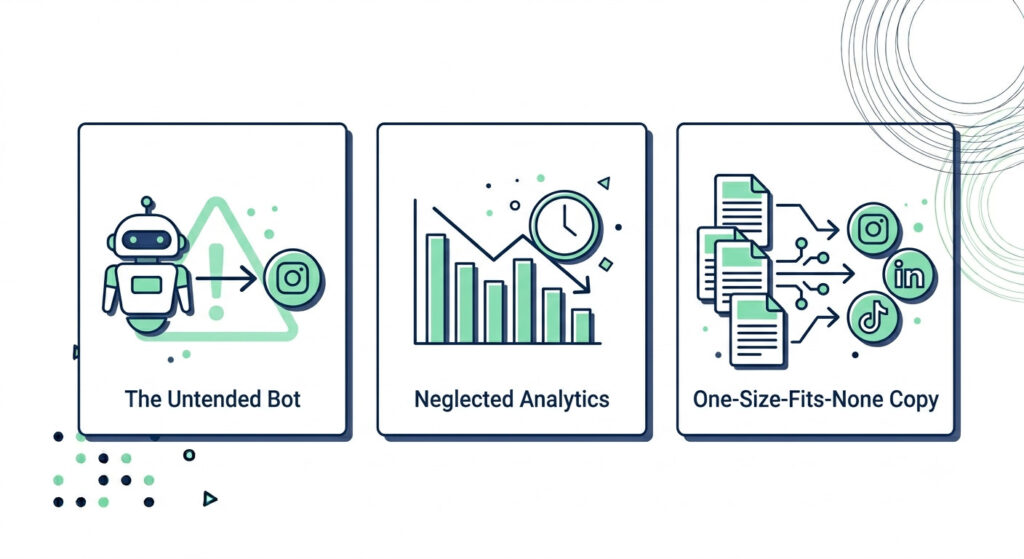
| Mistake | Consequence | Fix |
|---|---|---|
| Skipping Human-in-the-Loop review | Content sounds generic, brand trust erodes | Always build a HITL approval gate before publishing |
| Setting and forgetting analytics | Posting volume increases, but performance quietly declines | Monthly analytics audit using Metricool’s engagement dashboard |
| Same caption, every platform | Reach tanks because platform-native signals are ignored | Tone and format adjusted per channel at drafting stage |
Mistake 1 — Skipping Your Human Review Gate
The most common and most damaging mistake in social media automation is removing human oversight from the publishing pipeline entirely.
According to Clutch’s 2026 Brand Authenticity Playbook, 59% of consumers notice when brand content has become robotic in tone — and 19% actively distrust AI-generated messaging that sounds like it was never touched by a human. That’s not a small reputational risk. That’s your positioning eroding post by post.
This happens when the Human-in-the-Loop (HITL) review step gets removed in the name of efficiency. The fix is simple: never publish directly from an AI drafting agent without a pause gate. In your Make.com scenario, this looks like a Google Sheets webhook that holds the post in a “Pending Review” status until you mark it approved. In Metricool, it’s the “Scheduled (Pending)” queue you scan once a week.
Ten minutes of review per week is not overhead — it’s brand protection.
Mistake 2 — Setting It and Forgetting the Analytics
Automation creates consistency. But consistency posting the wrong content just means you’re consistently underperforming.
The set-and-forget trap happens when small business owners build the pipeline, queue 30 days of content, and never look at what’s actually connecting with their audience. Over time, your AI drafting layer keeps generating content in the same style — with no feedback loop to make it smarter.
The fix is a monthly 20-minute analytics audit in Metricool’s performance dashboard. Pull your top five and bottom five posts by engagement rate for the month. Look for patterns: which content type, caption length, hook style, and posting time performed best. Then update your LLM system prompt with those findings before generating the next batch. That single habit turns your automation from a static machine into a learning system.
What to track monthly in Metricool:
- Engagement rate per platform (not vanity metrics — likes are cheap; saves and shares are signals)
- Best-performing posting time slots vs. your current schedule
- Caption style patterns in top-performing posts (storytelling vs. data-led vs. question-hook)
- Follower growth rate relative to posting frequency
Mistake 3 — Ignoring Platform-Specific Formatting
Automating social media scheduling for your small business doesn’t mean publishing the same caption everywhere.
This is one of the fastest ways to get algorithmically penalized. Every platform’s recommendation engine reads native formatting signals — LinkedIn rewards long-form, expertise-driven posts; TikTok surfaces hook-led, punchy openers; Instagram responds to visual-first storytelling; Facebook favors shareable, community-oriented content. When you push one generic caption to all channels, you’re working against every algorithm simultaneously.
The fix is built directly into your AI drafting stage: every LLM prompt should specify the target platform, its character limit, its tone guideline, and your Brand Voice Document as system context. If you’re using Claude 4.5 via Make.com’s HTTP module, this is a single additional instruction line per platform branch in your router setup. The cost is a few seconds per scenario build. The payoff is content that performs natively on every channel.
Pro-Tip: Add an “Emergency Pause” step to your Make.com scenario. Create a single cell in your Google Sheets content database labeled “Automation Status” with a toggle value of ON or OFF. Add a filter module at the start of every scenario that checks this cell before running anything. If something happens in the news, your industry, or the world that makes scheduled content feel tone-deaf, you can halt your entire publishing pipeline in under 10 seconds — without logging into a single scheduling tool.
Frequently Asked Questions
What is the best tool to automate social media scheduling for a small business in 2026?
Metricool is consistently rated among the best all-in-one social media scheduling tools for small businesses in 2026, offering scheduling across 10+ platforms, competitor analytics, and a built-in AI assistant on a generous free plan. For teams wanting full pipeline automation, pairing Metricool with Make.com and an LLM like GPT-5 creates a near-fully autonomous content engine. The best choice depends on budget, technical comfort, and the number of brands being managed.
How much time can I save by automating social media scheduling?
Small business owners who implement AI-powered social media automation workflows report saving 6+ hours per week on content creation and publishing tasks alone. The efficiency gains compound over time as your AI tools learn your brand’s performance patterns and optimize posting schedules automatically. Even starting with a basic scheduler like Metricool’s free plan can eliminate daily manual posting entirely.
Is Metricool good for small businesses?
Yes — Metricool is particularly well-suited for small businesses and solopreneurs due to its generous free plan (1 brand, 50 posts/month, competitor tracking, and AI assistant access), its visual drag-and-drop content planner, and its analytics depth that rivals far more expensive tools. Users on G2 (4.5/5) and Trustpilot (4.2/5) consistently praise the analytics and multi-platform scheduling capabilities. The REST API also allows growth-stage businesses to connect Metricool into custom automation pipelines via Make.com.
Can AI write and schedule social media posts automatically?
Yes — in 2026, AI agents can research trending topics, generate 30 days of platform-specific captions and visuals, and queue them directly to a scheduler like Metricool with minimal human involvement. However, best practice requires a Human-in-the-Loop (HITL) approval stage before publishing to ensure brand voice accuracy and avoid reputational risk from unreviewed AI content. Tools like Make.com, PostEverywhere Agents, and Metricool’s API make this end-to-end pipeline achievable without code.
You’ve Got the System. Now Build It.
The small business owners winning on social media in 2026 are not the ones posting more. They’re the ones who automated smarter — built a four-stage Research → Draft → Review → Publish workflow, anchored it with a tool like Metricool, and wired it all together through Make.com so the calendar fills itself.
That’s the system you now have the full architecture for.
Here’s what you’ve covered:
- The four-stage automation workflow — how to go from AI research briefing to scheduled, published post without touching each step manually
- Metricool as your scheduling layer — one dashboard, 10+ platforms, analytics included, free to start
- Make.com as your integration glue — connecting your LLM, approval gate, and scheduler into a single automated pipeline
- OpusClip for video — repurposing long-form content into short-form clips on autopilot
- The three mistakes that break automation — and the exact fixes to keep your brand voice intact while the system runs
The only variable left is how fast you deploy it.
You can build this stack component by component over the next few weeks. Or you can skip the from-scratch assembly and use a pre-built system that’s already been tested, mapped, and packaged for a small business owner who doesn’t have hours to troubleshoot scenarios.
Pro-Tip: Your first week of automation is the most important one. Run your Make.com scenario in test mode, let Metricool queue 7 days of posts rather than 30, and monitor engagement daily. The data you collect in Week 1 — best-performing caption style, optimal posting times, platform-specific engagement rates — becomes the foundation that makes every future batch smarter. Start tight, iterate fast, then scale.
The AI Automation Blueprint gives you every prompt, workflow template, and Make.com integration map covered in this guide — pre-built and ready to deploy in your business this week. Every stage of the four-step pipeline is already mapped out: the Perplexity research agent setup, the LLM drafting prompts for each platform, the Human-in-the-Loop Google Sheets approval architecture, and the Metricool API connection. If you’re serious about scaling without hiring, this is your next move.