You know your business needs automation. You have done the research. You have landed on two tools — Zapier and Make.com — and now you are stuck.
Both are no-code. Both are popular. Both promise to save you time. But they are not the same tool, and choosing the wrong one means wasted setup time, a frustrating rebuild, or paying for features you never needed in the first place.
This guide breaks down Zapier vs Make.com for small business across pricing, ease of use, and workflow complexity — so you can make the right call the first time.
No feature lists padded out to fill a page. No vague “it depends” conclusions. Just a direct, honest comparison built for small business owners who need a clear answer and want to get moving.
By the end of this post, you will know exactly which tool fits your business right now — and which one to grow into later.
If you are still building the foundations of your automation strategy, start with our guide on AI workflow automation first. If you are ready to choose your tool and build, keep reading.
Table of Contents
Why Your Choice of Automation Tool Actually Matters
Most small business owners treat this decision as a minor one. It is not. The automation tool you choose becomes the backbone of every workflow you build — and switching later means rebuilding everything from scratch.
The Wrong Tool Adds Friction Instead of Removing It
Automation is supposed to save time. But pick the wrong tool and it creates a different kind of problem.
A tool that is too complex for your current needs means you spend more time figuring out the platform than actually building workflows. A tool that is too limited for your future needs means you hit a ceiling six months in and face a painful, time-consuming migration to something more capable.
The right tool does not demand your attention. It grows with your business, handles increasing complexity without requiring a rebuild, and stays completely out of your way once a workflow is live.
What Small Business Owners Actually Need From an Automation Tool
Before comparing features, it helps to be clear on what actually matters for a small business. The criteria are straightforward:
- Ease of setup — you should not need a developer, a consultant, or a week of video tutorials to get your first workflow running
- Reliable integrations — the tool must connect to the software you already use, whether that is HubSpot, Gmail, Xero, or Slack
- Affordable pricing — cost should scale with the value the tool delivers, not punish you for being at an early stage of growth
- Flexibility to grow — what works for five automations today needs to work for twenty automations in six months
Finding the best automation tool for small business means balancing simplicity, flexibility, and price — and neither Zapier nor Make.com wins on every dimension. That is exactly what this comparison unpacks.
If you want to see which workflows are worth building first regardless of tool, read our guide on 5 AI automations that save 20+ hours a month — it gives you the full picture before you commit to a platform.
Zapier vs Make.com — A Direct Comparison
Both tools do the same fundamental job — they connect your apps and automate repetitive tasks without code. But the way they do it, and the type of business they suit best, are quite different. Here is what you need to know.
Overview of Each Tool
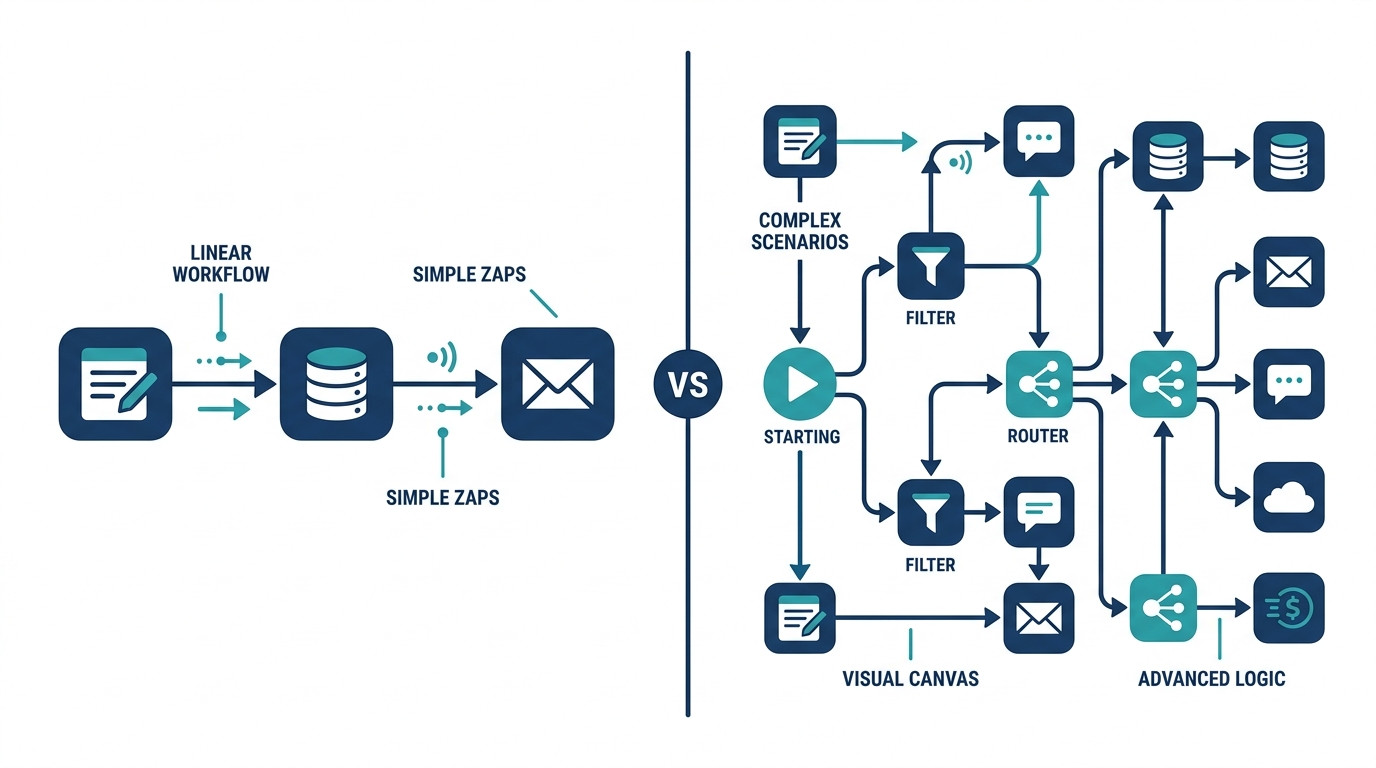
Zapier is the most widely used no-code automation tool in the world. It connects 6,000+ apps through a simple, linear workflow builder — one trigger, one or more actions, done. It is built for speed. Most users have their first automation running in under 15 minutes. If ease of use and fast setup are your priorities, Zapier is hard to beat.
Make.com (formerly Integromat) takes a different approach. Instead of a linear step-by-step flow, Make.com uses a visual canvas where you build scenario-based workflows with branching logic, multiple paths, and advanced data mapping. It supports far more complex automations than Zapier — and at a significantly lower cost per operation at scale. The trade-off is a steeper learning curve that takes longer to get comfortable with.
Think of it this way: Zapier is the tool you pick up and use immediately. Make.com is the tool you invest a little time learning and then never outgrow.
Side-by-Side Comparison
| Feature | Zapier | Make.com |
|---|---|---|
| Ease of use | ⭐⭐⭐⭐⭐ Very beginner-friendly | ⭐⭐⭐ Moderate learning curve |
| Workflow complexity | Linear, simple | Visual, multi-path, complex |
| App integrations | 6,000+ | 1,000+ |
| Free tier | 100 tasks/month | 1,000 operations/month |
| Paid plans start | ~$19.99/month | ~$9/month |
| Best for | Quick, simple automations | Complex multi-step workflows |
| Speed to first workflow | Under 15 minutes | 30–60 minutes |
| Recommended for beginners | ✅ Yes | ⚠️ With guidance |

When it comes to Zapier vs Make.com for small business, the right choice depends on your current workflow complexity and your budget. Neither tool is objectively better — they are built for different stages and different needs.
This no-code automation comparison shows that both tools are valuable — but for different types of business. A solopreneur running three simple automations has very different needs from a small business owner building a connected system of ten or more workflows across multiple platforms.
The next two sections will tell you exactly which one fits where you are right now.
When to Choose Zapier
Zapier is the right tool for a specific type of small business owner — and if that description fits you, there is no better place to start.
Zapier Is the Better Choice If…
- You are new to automation and want to get your first workflow live today, not after a week of tutorials
- Your automations are straightforward — a single trigger followed by one or two actions, like “new form submission → send email → log in CRM”
- You use popular tools like Gmail, Slack, HubSpot, Typeform, Calendly, or Google Sheets — Zapier’s 6,000+ integrations mean your stack is almost certainly supported
- You value speed and simplicity over advanced customisation — Zapier gets out of your way and lets you build fast
- You have a slightly higher budget and want the most reliable, best-documented, and most widely supported automation platform available
If you ticked three or more of those boxes, Zapier is your tool. Start with the free tier, build your first workflow today, and upgrade only when your task volume demands it.

Zapier’s Limitations to Know
No tool is perfect. Before you commit, here is where Zapier falls short:
- The free tier is limited to 100 tasks per month — for a small business running multiple automations, this fills up faster than you expect
- Paid tiers jump in price significantly compared to Make.com — if you are cost-sensitive and plan to scale your automations, this gap becomes meaningful quickly
- Less suited to complex workflows — if your automations involve conditional logic, branching paths, or advanced data transformation, Zapier will feel limiting sooner rather than later
For simple, high-reliability automations where speed and ease of use matter most, Zapier remains the best starting point for most small business owners. Just know where its ceiling is before you build your entire stack around it.
When to Choose Make.com
Make.com is not the easiest tool to start with — but for the right small business owner, it is the most powerful and cost-effective automation platform available. Here is how to know if it is the right fit for you.
Make.com Is the Better Choice If…
- You have used automation tools before and are comfortable working with visual, canvas-based builders rather than linear step-by-step flows
- Your workflows involve multiple conditions or branches — for example, “if the lead came from Source A, do this; if from Source B, do that” — Make.com handles this natively where Zapier struggles
- You want more operations for less money — Make.com’s free tier includes 1,000 operations per month compared to Zapier’s 100, and paid plans start at around $9 per month
- You are building a connected system of automations across multiple tools, not just a handful of isolated workflows
- You want full control over how data is mapped, filtered, and processed between apps — Make.com gives you granular control that Zapier simply does not offer at the same price point
If your ambition is to build a fully automated small business operation — not just a few quick wins — Make.com is the platform built for that goal.
Make.com’s Limitations to Know
Make.com is the more powerful tool, but it comes with real trade-offs worth understanding before you start:
- The visual interface takes longer to learn than Zapier’s linear builder — expect 30 to 60 minutes to build your first workflow versus under 15 minutes with Zapier
- Fewer app integrations — with around 1,000 supported apps compared to Zapier’s 6,000+, there is a small chance your specific tool is not yet supported
- Setup time for complex workflows is significantly higher — the power Make.com offers requires more configuration, which means more time investment upfront before the automation runs itself
For small business owners who are ready to invest that setup time, the payoff is a more flexible, more affordable, and more scalable automation system in the long run.
Which Tool Is Better for Common Small Business Workflows?
Choosing between Zapier and Make.com becomes much easier when you map the decision to the specific workflows you are trying to build. Here is a direct breakdown of which tool performs better for the automations most small businesses actually need.
| Workflow | Better Tool | Why |
|---|---|---|
| Lead follow-up sequence | Zapier or Make.com | Both work well; Zapier is faster to set up for the first time |
| Invoice automation | Make.com | Better data mapping and control for multi-step invoicing workflows |
| Client onboarding | Make.com | Handles multiple conditional branches across several tools cleanly |
| Social media scheduling | Zapier | Simple trigger-to-post workflow that Zapier handles in minutes |
| Meeting notes distribution | Zapier or Make.com | Depends on the transcription and project management tools you use |
| CRM data syncing | Make.com | Superior data transformation and field mapping for complex CRM setups |
| Email marketing triggers | Zapier | Fastest and most reliable integration with major email platforms |
The pattern is clear. Zapier wins when the workflow is simple, linear, and needs to be live quickly. Make.com wins when the workflow involves multiple steps, conditional logic, or complex data handling between tools.
For most small business owners comparing Make.com vs Zapier, the answer comes down to one question: do you need simplicity or flexibility? Answer that honestly and the right tool becomes obvious.
If you are building the five core workflows every small business needs, the tool-by-tool breakdown above tells you exactly where to start — and which platform to build each one on.
Not Sure Which Tool to Start With?
You have just seen how Zapier and Make.com compare across pricing, ease of use, and the workflows that matter most to your business. You know which one fits better. Now the next question is: how long will it take to actually build everything?
If you are starting from scratch, the honest answer is a few hours per workflow — minimum. That is time most small business owners do not have.
Skip the setup entirely.
The AI Automation Blueprint for Small Business Owners includes pre-built workflows for both Zapier and Make.com — lead follow-up, invoicing, client onboarding, social scheduling, and meeting notes — so whichever tool you choose, you have a done-for-you starting point ready to go live in under 24 hours.
No building from scratch. No trial and error. No afternoon lost figuring out which trigger connects to which action.
Just plug in and run.
Pricing Breakdown — What You Will Actually Pay
Pricing is often the deciding factor for small business owners choosing between these two tools. Here is exactly what each one costs — and what you actually get for your money.
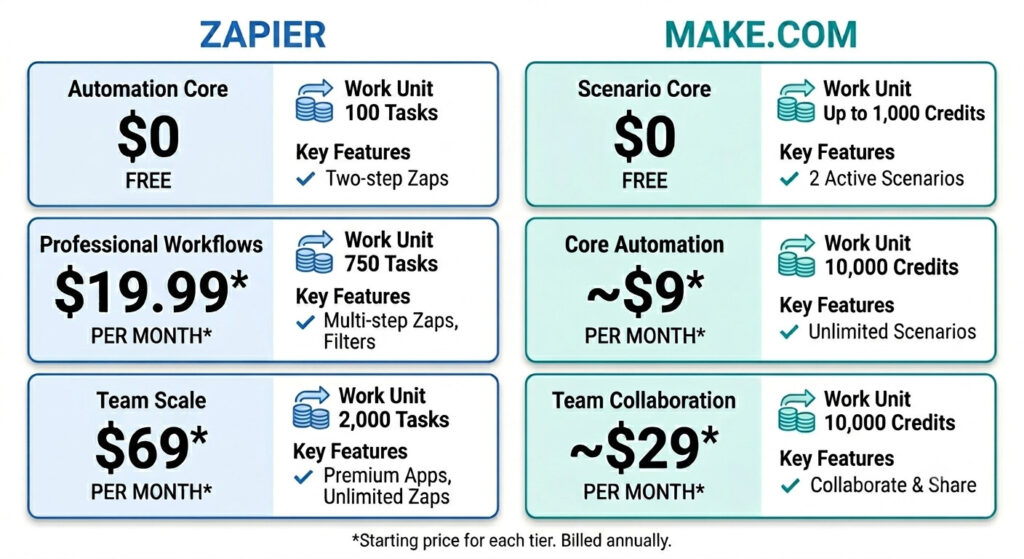
Zapier Pricing
| Plan | Price | Tasks/Month | Key Features |
|---|---|---|---|
| Free | $0 | 100 tasks | Two-step Zaps only |
| Professional | $19.99/month* | 750 tasks | Multi-step Zaps, filters |
| Team | $69/month* | 2,000 tasks | Premium apps, unlimited Zaps |
*Starting price for each tier. Billed annually
Zapier’s free tier is enough to test the platform and run one or two very simple automations. Once you move to multi-step workflows — which most small businesses need — you are on a paid plan from day one.
Best for: Businesses running under 10 simple automations per month who value ease of use over cost efficiency.
For up-to-date rates, please visit zapier.com/pricing.
Make.com Pricing
| Plan | Price | Credits/Month | Key Features |
|---|---|---|---|
| Free | $0 | Up to 1,000 credits | 2 active scenarios |
| Core | ~$9/month* | 10,000 credits | Unlimited scenarios |
| Pro | ~$16/month* | 10,000 credits | Advanced tools, priority support |
| Teams | ~$29/month* | 10,000 credits | Create and share scenario templates |
*Starting price for each tier. Billed annually
Make.com’s free tier is ten times more generous than Zapier’s in terms of monthly operations. And the jump from free to paid is significantly smaller — $9 per month versus $19.99.
Best for: Businesses running complex or high-volume workflows who want maximum capability at the lowest possible monthly cost.
For up-to-date rates, please visit make.com/en/pricing.
The Real Cost Comparison
Strip away the feature lists and three clear conclusions emerge:
- For simple automations at low volume — both free tiers are sufficient to start, test, and validate your first workflows without spending anything
- For scaling — Make.com is significantly more cost-effective per operation, making it the smarter long-term investment as your automation library grows
- For ease and reliability — Zapier’s paid tiers justify the higher cost for non-technical users who want the smoothest possible experience and the widest app support
Put simply: if budget is your primary concern, Make.com wins. If ease of use is your primary concern, Zapier wins. If you want both, start with Zapier’s free tier and migrate to Make.com when you hit its ceiling.
Frequently Asked Questions
Is Zapier or Make.com better for small business?
Zapier is better for beginners who want simple automations set up quickly and reliably. Make.com is better for small businesses with more complex workflows and tighter budgets. Both are strong, capable tools — the right choice depends on where your business is right now and how complex your automation needs are.
Is Make.com cheaper than Zapier?
Yes. Make.com is significantly cheaper than Zapier at equivalent usage levels. Make.com’s paid plans start at around $9 per month compared to Zapier’s $19.99, and Make.com offers considerably more operations per dollar as your workflow volume scales. For cost-conscious small business owners, Make.com is the more efficient long-term investment.
Can I use both Zapier and Make.com together?
Yes. Some small businesses use Zapier for simple integrations where its 6,000+ app library has the edge, and Make.com for more complex multi-step workflows where flexibility matters more. That said, starting with one tool, mastering it fully, and then expanding is the recommended approach — managing two platforms from day one adds unnecessary complexity.
Is Make.com hard to learn for non-technical users?
Make.com has a steeper learning curve than Zapier, but it is still a fully no-code tool — no technical background required. Most non-technical users can build their first working workflow by following a step-by-step guide. The AI Automation Blueprint includes pre-built Make.com scenarios that shortcut the learning process significantly, getting you from zero to live in a fraction of the time.
Which automation tool is best for HubSpot integration?
Both Zapier and Make.com integrate well with HubSpot. Zapier offers a faster, more straightforward setup for basic HubSpot workflows such as contact creation and email triggers. Make.com provides more advanced data handling and field mapping for complex CRM automations where precision and conditional logic matter.
Conclusion
Here is the verdict.
Zapier wins on ease of use, speed of setup, and breadth of app integrations. If you want your first automation live today with minimal friction, Zapier is where you start.
Make.com wins on flexibility, workflow complexity, and cost at scale. If you are ready to build a connected system of automations — or you simply want more operations for less money — Make.com is the smarter long-term investment.
The direct recommendation is simple. If you are just starting out with automation, begin with Zapier. Get comfortable with the concept, build your first two or three workflows, and prove the value to yourself. If you are ready to go deeper, build complex multi-step workflows, or you are already hitting Zapier’s task limits, switch to Make.com and do not look back.
When it comes to Zapier vs Make.com for small business, there is no wrong answer — only the tool that fits where you are right now.
Both tools are part of a broader ecosystem of no-code platforms designed to help small businesses run smarter. For a full breakdown of every tool worth using, read our guide on the best AI tools for workflow automation in small business (LINK TO BE ADDED) — it covers everything you need to build a complete automation stack.
Whichever tool you choose — get your workflows pre-built and ready to run.
The AI Automation Blueprint for Small Business Owners includes done-for-you automation workflows compatible with both Zapier and Make.com — complete with setup guides, trigger logic, and email sequences — so you can go live today without starting from scratch.
You picked your tool. Now skip straight to results.