Table of Contents
Small business owners spend countless hours on repetitive tasks: processing invoices, updating customer records, sending follow-up emails, managing inventory alerts, and syncing data between tools. These manual processes drain time that could be spent on growth, strategy, and customer relationships. The challenge intensifies as competition increases and customers demand faster, more personalized service.
Make.com vs n8n are two leading AI automation platforms that solve this exact problem. Both enable small businesses to build sophisticated workflows without coding, but they take different approaches to pricing, ease of use, and flexibility. Choosing between them can significantly impact your operational costs, team productivity, and ability to scale.
This guide walks you through everything a small business owner needs to know about Make.com and n8n—from pricing models and learning curves to real-world use cases and integration capabilities. By the end, you’ll understand which platform aligns with your budget, technical comfort level, and automation goals.
Why does this matter now? AI automation has shifted from a competitive advantage to an operational necessity. Tools that once cost thousands per month are now accessible to small teams with limited budgets. The businesses that adopt these workflows fastest gain months or even years of competitive advantage over those still managing tasks manually.
Understanding Automation Platforms: What Are Make.com and n8n?
Workflow automation is the process of connecting your business tools so they communicate and complete tasks automatically—without manual intervention. Instead of manually copying data from a form into your CRM, or sending a follow-up email after each customer purchase, an automation platform does these tasks for you.
For small businesses, this translates directly to cost savings, faster operations, and fewer human errors. A 5-person team automating just 5–10 routine tasks can save 10–15 hours per week—equivalent to hiring a part-time employee for a fraction of the cost.
What is Make.com?
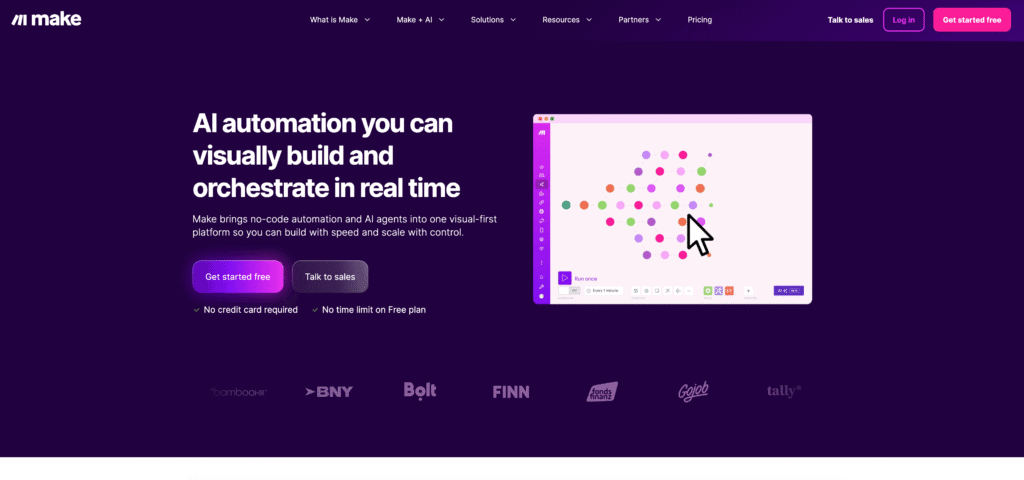
Make.com (formerly Integromat) is a visual, cloud-based automation platform designed for non-technical users. It operates using a drag-and-drop interface where you build “scenarios”—workflows that connect apps and trigger actions in sequence. Make.com integrates with 2,000+ apps and is known for its user-friendly design, extensive template library, and quick onboarding.
What is n8n?
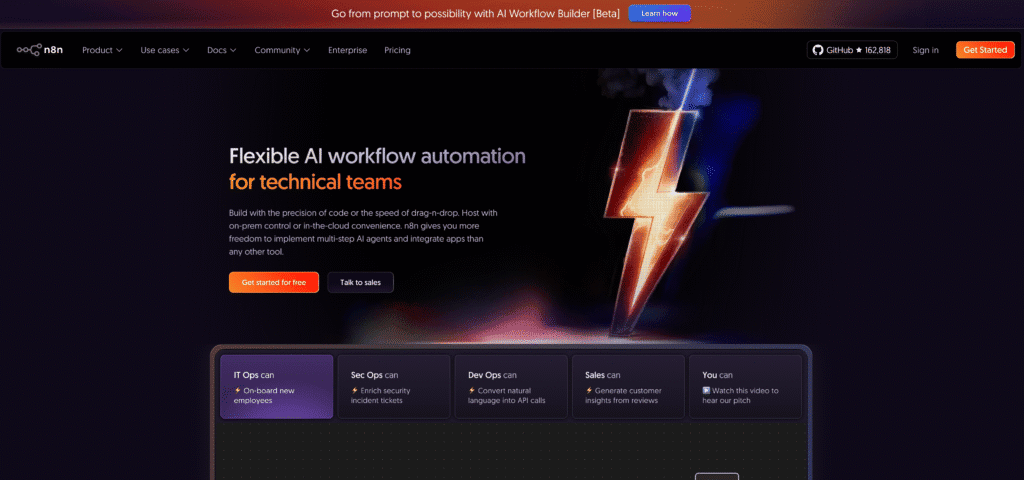
n8n is an automation platform that emphasizes flexibility, developer control, and AI integration. It offers both a cloud version and a free, self-hosted community edition. n8n supports 400+ integrations, allows custom code execution, and is popular among technical teams, developers, and businesses handling complex or sensitive workflows.
Make.com vs n8n: Side-by-Side Pricing Comparison
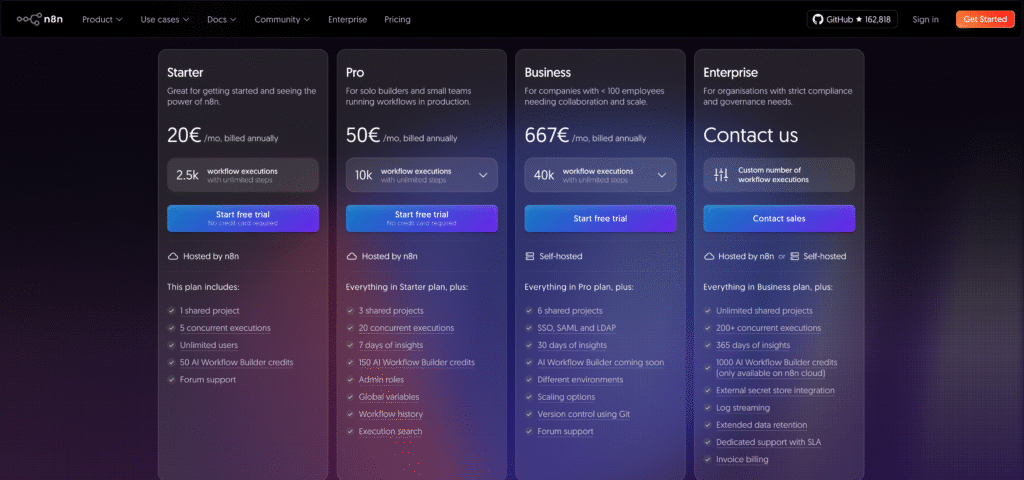
Pricing is often the deciding factor for small businesses. The two platforms use fundamentally different billing models, which dramatically affects cost depending on your workflow complexity.
| Feature | Make.com | n8n |
|---|---|---|
| Free Plan | 1,000 operations/month | Unlimited (self-hosted) or limited cloud trial |
| Entry-Level Paid Plan | Core: $9/month (10,000 operations) | Cloud Starter: $24/month (2,500 executions) |
| Mid-Level Plan | Pro: $16/month (40,000 operations) | Cloud Pro: $60/month (10,000+ executions) |
| Team Plan | Teams: $29/month per user | Business: Custom pricing |
| Billing Model | Per operation (each module counts) | Per execution (entire workflow = 1 execution) |
| Self-Hosted Option | No | Yes (free) |
How Pricing Actually Works in Practice
Make.com’s Operation-Based Model:
Every module (action, filter, condition) in your workflow consumes operations. A simple scenario with 3 steps = 3 operations per run. A complex scenario with 20 steps = 20 operations per run.
For example, if you automate invoice processing for 100 invoices daily, and each workflow has 8 modules, you use 800 operations daily (24,000 monthly). This fits comfortably in the Pro plan at $16/month.
However, if your workflows have many steps or run frequently, costs can escalate.
n8n’s Execution-Based Model:
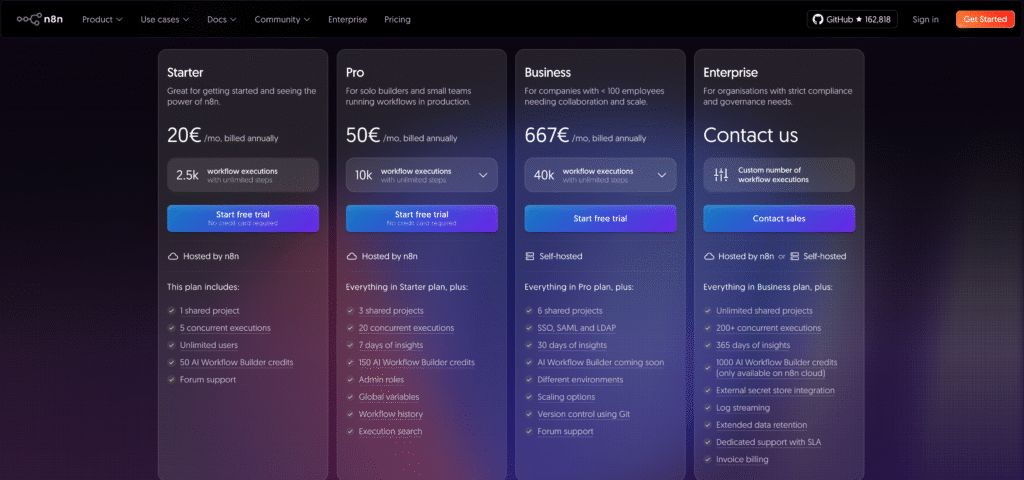
A workflow runs once = 1 execution, regardless of whether it has 5 steps or 50. You only pay for executions, not for complexity.
If you run 2,500 monthly executions of a 50-step workflow, that’s 1 execution each time. Compare this to Make, where the same workflow would cost significantly more due to the operation count.
Which model is cheaper?
It depends on your workflow characteristics:
- Simple, frequent workflows (e.g., daily CRM updates, email sending): Make.com is usually cheaper
- Complex, high-step workflows (e.g., multi-step data processing, AI agent workflows): n8n is usually cheaper
- High-volume processing (e.g., batch invoice handling): n8n’s per-execution model scales better
For a typical small business with 20–50 workflows of moderate complexity, both platforms cost $20–60/month, making the decision based on features rather than price alone.
Ease of Use and Learning Curve: Which Is More Beginner-Friendly?
Small business owners often don’t have dedicated technical staff. The ability to learn and build workflows independently—without hiring a developer—is crucial.
Make.com: Designed for Non-Technical Users
Strengths:
- Visual drag-and-drop builder: Every workflow is built graphically. You search for apps, drag modules onto the canvas, and connect them visually.
- Extensive templates: Make.com provides 1,000+ pre-built templates for common workflows (e.g., “Send Slack notification when new Airtable record is added”). You can use a template and customize it in minutes.
- Large community: Over a decade of users have published tutorials, templates, and solutions online. Searching for “Make automate [your workflow]” usually yields ready-made examples.
- Intuitive data mapping: Connecting field outputs from one module to inputs in the next is a simple click-and-select process.
- Beginner-focused documentation: Make’s help center is written for non-technical readers.
Learning curve: Most non-technical users can build a simple automation (2–3 modules) within 1–2 hours. A moderately complex workflow (10+ modules) might take 1–2 days of learning.
n8n: More Powerful, Steeper Learning Curve
Strengths:
- Low-code/code flexibility: You can build workflows visually, but also write custom JavaScript or Python for advanced logic.
- Better for technical users: If you understand APIs, JSON, or basic coding, n8n is more intuitive and powerful.
- Node-based editor: Similar to visual programming tools like Node-RED. Intuitive for developers, less so for non-technical users.
Drawbacks:
- Steeper onboarding: Non-technical users often need 1–2 weeks to feel comfortable building workflows from scratch.
- API knowledge helpful: Understanding how APIs work, how to handle JSON, and basic logic flow accelerates learning.
- Documentation improving: Recent updates have made docs more beginner-friendly, but it still assumes some technical familiarity.
Learning curve: Non-technical users typically need 2–4 weeks to build their first workflow independently. Technical users (developers, IT staff) can build advanced workflows within hours.
Comparison: Building Your First Automation
Scenario: Automate creating a Slack notification whenever a new customer signup arrives via a Typeform survey.
With Make.com (estimated time: 30 minutes to 1 hour)
- Open Make and click “Create a new scenario”
- Search for “Typeform” and select the “Watch responses” trigger
- Click the Typeform icon, authenticate your account, and select the form
- Click the “+” to add an action module and search for “Slack”
- Select “Send a message” and authenticate Slack
- Map the Typeform fields (name, email, message) to the Slack message template
- Test and activate
With n8n (estimated time: 1–2 hours for non-technical users)
- Open n8n and create a new workflow
- Add a “Typeform” trigger node and authenticate
- Configure which form and responses to watch (requires understanding Typeform’s data structure)
- Add a “Slack” node, authenticate, and select “Send message”
- Map the data, potentially using n8n’s expression editor to transform data if needed
- Test (which requires more debugging understanding)
- Activate
Winner for beginners: Make.com is significantly faster for first-time automation builders.
Feature Comparison: Core Capabilities for Small Businesses
Both platforms handle the essential automation needs of small businesses. The differences emerge in advanced features and how you work with complex or custom logic.
Integrations and App Support
- 3,000+ apps supported with pre-built modules for nearly every popular business tool
- Includes CRM tools (HubSpot, Salesforce, Pipedrive), e-commerce (Shopify, WooCommerce), accounting (QuickBooks, FreshBooks), communication (Slack, Gmail, Microsoft Teams), and more
- Pre-built modules often have user-friendly dropdown menus (“Select field,” “Select action”) rather than requiring API knowledge
- New integrations added regularly, though some niche tools may not be supported
n8n:
- 1200+ integrations with growing coverage
- Supports major platforms but includes fewer pre-built modules for specialized or newer tools
- Includes generic “HTTP Request” and “API” nodes that let you connect almost any service if a dedicated integration doesn’t exist
- Better for custom integrations and private APIs (internal tools)
Winner for small business: Make.com, due to broader coverage of popular SMB tools (Shopify, Typeform, Mailchimp, etc.).
AI Integration and Intelligent Automation
- Native AI integration through Make’s AI Provider (launched 2025), eliminating the need to manage external API keys
- Access to multiple LLMs (OpenAI, Gemini, Anthropic) directly within Make
- Simpler AI workflows for beginners, but fewer advanced customization options
- New Module Tools feature (2025) allows any Make module to be converted into a callable tool for AI agents
n8n:
- Advanced AI capabilities with support for OpenAI (ChatGPT), Claude, Gemini, and Perplexity API endpoints
- In self-hosted mode, you can integrate private or fine-tuned LLMs
- More powerful for building AI agents and RAG (Retrieval-Augmented Generation) workflows
- Better for complex, reasoning-heavy automation
Example use case: An e-commerce brand wants to automate customer support responses using AI. Make.com can set up a simple workflow (receive email → run through AI → send response) in an hour. n8n allows building a more sophisticated AI agent that can retrieve customer history, check product inventory, and reason about the best response.
Winner for AI: n8n for advanced AI workflows; Make.com for simple, quick AI integrations.
Data Transformation and Custom Logic
- Provides filters, routers, and aggregators for branching logic and data manipulation
- Functions library for text, date, and math operations
- Visual conditional logic (If-Then-Else) coming in early 2026
- Limited ability to handle complex data transformations without custom code
n8n:
- Native support for JavaScript code execution via Code nodes
- More flexible handling of JSON data, APIs, and complex transformations
- Ability to write Python code for certain operations (in advanced deployments)
- Better for workflows involving complex business logic or data wrangling
Winner for custom logic: n8n, especially for complex data transformations or business logic that requires coding.
Security and Data Control
- Cloud-only (data stored on Make’s servers)
- SOC 2 and GDPR compliant
- No option to self-host or keep data on-premise
- Good for most small businesses; not suitable for highly regulated industries requiring on-premise data storage
n8n:
- Self-hosted Community Edition (free): Complete data control; workflows and credentials stay on your servers
- n8n Cloud: GDPR-compliant, hosted in Frankfurt
- Flexibility to start with self-hosted and migrate to cloud anytime (or vice versa)
- Better for healthcare, finance, or businesses handling sensitive data
Winner for security/compliance: n8n, particularly for regulated industries or privacy-conscious businesses.
Make.com vs n8n: Common Use Cases for Small Businesses
Understanding how other small businesses use these platforms helps you envision what’s possible for your operations.
Example 1: E-Commerce Order Automation
Business: A 3-person Shopify store selling subscription boxes.
Workflow: When a new order is placed, automatically create an invoice in QuickBooks, send a personalized confirmation email, update inventory in Airtable, and post a notification in Slack.
With Make.com:
- 8 modules: Shopify trigger → QuickBooks → Gmail → Airtable → Slack (plus filters and data mapping)
- 8 operations per order × 50 orders/day = 400 operations/day
- Monthly cost: $16 (Pro plan covers 40,000 operations)
- Time to build: 2–3 hours for someone with Make.com experience
With n8n:
- 8-node workflow = 1 execution per order
- 50 orders/day × 30 days = 1,500 executions/month
- Monthly cost: $24 (Cloud Starter: 2,500 executions included)
- Time to build: 4–5 hours for a non-technical user, 1–2 hours for a technical user
Winner: Make.com is slightly cheaper and faster for this straightforward multi-step workflow.
Example 2: Lead Scoring and CRM Automation
Business: A 6-person marketing agency that needs to score leads based on website behavior and qualification criteria.
Workflow: When a lead fills out a form, enrich their data using an external API, score them based on engagement metrics, add them to HubSpot with the score, and create a task for sales if the score exceeds a threshold.
With Make.com:
- This workflow requires conditional branching and API calls
- Approximately 12–15 modules (trigger, HTTP calls, filters, routers, CRM actions)
- 12–15 operations per lead × 30 leads/day = 360–450 operations/day
- Monthly cost: $16 (Pro plan)
- Complexity: Moderate; the visual router is helpful but data transformation is limited
With n8n:
- Same workflow, but you can use JavaScript to build complex scoring logic in a single Code node
- Approximately 8–10 nodes (simpler and cleaner structure)
- 30 leads/day = 30 executions/day = ~900 executions/month
- Monthly cost: $24 (Cloud Starter)
- Complexity: Medium; the Code node makes business logic cleaner and easier to maintain
Winner: Depends on team preference. Make.com wins on cost; n8n wins on maintainability if your team includes a technical person.
Example 3: Invoice Processing and Accounting Automation
Business: A 10-person consulting firm manually entering invoices into QuickBooks and tracking expenses.
Workflow: When an invoice PDF arrives via email, extract vendor name, amount, and date using AI, automatically create a bill in QuickBooks, categorize it based on vendor type, and send a confirmation to the approver.
With Make.com:
- This involves 15+ modules: email trigger, attachment handling, AI extraction, QuickBooks actions, conditional routing, email notification
- 15+ operations per invoice × 40 invoices/month = 600+ operations/month
- Monthly cost: $9–16 (Core or Pro plan)
- Limitation: AI extraction is simpler; limited ability to fine-tune the extraction logic
With n8n:
- 10–12 nodes: email trigger, attachment handling, AI extraction with custom prompts, QuickBooks, conditional logic, notification
- 40 invoices = 40 executions/month
- Monthly cost: $24 (Cloud Starter; very low volume)
- Advantage: Can use advanced AI with RAG to extract invoices more accurately by referencing historical data or company-specific formats
- Self-hosted option: For sensitive financial data, run n8n locally (free) on a company server
Winner: n8n for regulated financial workflows and advanced AI processing; Make.com for simpler extraction and lower cost if the default AI is sufficient.
How These Platforms Transform Small Business Operations
To understand the real value of Make.com and n8n, let’s compare manual workflows to automated ones.
Invoice Processing: Manual vs. Automated
Manual Process (typical small business without automation):
- Accountant receives invoice email
- Opens PDF, manually reads vendor name, amount, date, and line items
- Logs into QuickBooks and creates a bill entry
- Categorizes the expense
- Files the email and PDF
- Time per invoice: 5–10 minutes
For 40 invoices/month = 200–400 minutes (3–6.5 hours) per month
Automated with Make.com or n8n:
- Invoice email arrives → AI extracts key details → Bill auto-created in QuickBooks → Expense auto-categorized → Confirmation sent to approver
- Time per invoice: 30 seconds for human approval
- For 40 invoices/month = 20 minutes of human time
Savings: 180–380 minutes per month = 2.5–6 hours per month = 30–72 hours per year
At $25/hour (accounting assistant wage), that’s $750–$1,800 in annual savings, achieved with a platform subscription costing $144–288/year.
Customer Support Automation: Manual vs. AI-Powered
Manual Process:
- Customer emails support inbox
- Support person reads and responds (5–15 minutes per email)
- 30 support emails/day × 10 minutes = 300 minutes/day
- With 1 part-time support person, this becomes a bottleneck
Automated with n8n + AI:
- Customer email arrives → AI reads the inquiry → If FAQs answer it, send auto-response; if not, create a ticket for human review
- AI categorizes and prioritizes by urgency
- ~70% of simple inquiries resolved in seconds
- Human support person handles 30% of complex cases (4–5 emails)
- Time per day: 50–75 minutes (instead of 300 minutes)
- Result: Customer satisfaction improves (instant first-response), support costs drop 60%
Making the Choice: Decision Framework for Small Businesses
With all the comparisons, which platform should your small business choose? Here’s a structured framework.
Choose Make.com If:
- Your team has minimal technical experience: Make’s user-friendly interface and template library make it the fastest path to automation.
- You work with popular SMB tools: You use Shopify, HubSpot, Typeform, Mailchimp, Zapier, or other mainstream tools that Make supports with pre-built modules.
- Workflows are straightforward and run infrequently: Simple 3–10 module workflows with low daily execution counts fit Make’s operation-based pricing better.
- You want no setup or maintenance: Make is fully cloud-based; no servers to manage, no DevOps work.
- Your budget is tight and you want simplicity: Start with Make’s free plan (1,000 operations) and upgrade to Core/Pro as you grow.
Ideal profile: A local boutique, freelancer, or service business with 1–5 people that wants quick automation wins without hiring a developer.
Choose n8n If:
- Your team includes a technical person: Developers, IT staff, or technical co-founders can leverage n8n’s flexibility and coding options.
- You handle sensitive or regulated data: Financial records, healthcare data, or customer PII require on-premise hosting. n8n’s free self-hosted edition is unbeatable.
- Your workflows are complex or high-volume: Multi-step, data-heavy, or AI-driven workflows are more cost-effective and easier to maintain on n8n.
- You need advanced AI capabilities: If you’re building AI agents or workflows that reason over large datasets, n8n is more powerful.
- You want to avoid vendor lock-in: n8n’s open-source foundation and self-hosting option mean you can migrate anytime without losing your workflows.
- Integration flexibility matters: If you use niche tools or internal APIs, n8n’s HTTP and custom code nodes give you unlimited flexibility.
Ideal profile: A tech-forward SMB with 5–20 employees, a compliance requirement, or complex automation needs. Also ideal for agencies building automation for clients.
Implementation Guide: Getting Started with Make.com or n8n
Starting with Make.com: A 30-Minute Quickstart
- Sign up for free: Visit make.com and create an account with your email
- Choose a template: Browse “Templates” and select one matching your first use case (e.g., “Create HubSpot contact from Google Form”)
- Customize the template:
- Click each module and authenticate apps (HubSpot, Google Forms)
- Map fields (form fields → HubSpot contact properties)
- Save and test with sample data
- Activate: Toggle “On” to run live
- Monitor: Check the Execution History to verify runs and troubleshoot
Common first automation: Gmail to Google Sheets, Typeform to CRM, Slack alerts for new leads, invoice-to-accounting integration.
Starting with n8n: A Learning-Focused Approach
- Option A (Cloud): Visit n8n.cloud, sign up, and start with a template
- Option B (Self-Hosted): Install Docker, run
docker run -it --rm --name n8n -p 5678:5678 -v n8n_data:/home/node/.n8n docker.n8n.io/n8nio/n8n, access at http://localhost:5678 - Choose your first workflow: A webhook trigger or app trigger (Stripe, Slack, Airtable)
- Add a simple node: Action module (send email, create record, HTTP request)
- Test and deploy: Use the “Execute Workflow” button to run in test mode
- Study documentation: n8n’s docs include node-by-node guides and code examples
Recommended first workflows: Slack notifications from external events, database record creation, simple lead routing.
Best Practices for Both Platforms
Regardless of which platform you choose:
- Start small: Automate one repetitive task before building a complex workflow
- Use templates or examples: Both platforms offer templates; modify them rather than building from scratch
- Test with dummy data: Always run test scenarios before going live
- Document your workflows: Add notes or comments explaining the workflow’s purpose and how it works
- Monitor execution logs: Regularly check that workflows run without errors
- Iterate: As your business grows, refine workflows based on real-world results
Frequently Asked Questions
Q1. How much does it actually cost to run Make.com or n8n for a small business?
For a typical small business automating 5–10 moderate workflows:
Make.com: $16–29/month (Pro plan or Teams plan)
n8n Cloud: $24–60/month (Starter to Pro)
n8n Self-Hosted: $0 (Community Edition is free)
For most small businesses, total annual automation cost ranges from $144–720, which is offset by 10–20 hours of time savings per month.
Q2. Which platform is better for e-commerce businesses?
Make.com wins for e-commerce because:
– Direct integrations with Shopify, WooCommerce, and major payment processors
– Easy template library for common e-commerce automations (abandoned cart emails, inventory sync, order notifications)
– Lower cost for high-frequency, simple workflows
n8n is better if:
– You have custom inventory management or complex fulfillment logic
– You need to self-host due to compliance
– You’re building white-label automation for clients
Q3. Can I start with one platform and switch to the other later?
Yes, but with caveats:
– Moving from Make to n8n: Workflows aren’t directly portable, but the logic is the same. You can manually rebuild workflows in n8n in roughly the same time it took to build them initially.
- Moving from n8n to Make: Similar—you’ll rebuild, not migrate directly. However, n8n’s self-hosted version lets you export workflow JSON for backup, so you can recreate logic quickly.
- Best approach: Start with Make if you’re non-technical; choose n8n if you have technical support and might scale into complex automation.
Q4. Do I need coding skills to use these platforms?
Make.com: No coding required. A business owner with zero technical experience can build automations in a few hours using templates and drag-and-drop.
n8n: Not required for simple workflows, but helpful for advanced use cases. If you understand APIs or have coding knowledge, n8n becomes significantly more powerful.
Q5. Which platform integrates better with AI tools like ChatGPT?
Both do, but differently:
– Make.com: Simpler AI integration through the Make AI Provider. Ideal for basic AI tasks (summarization, classification, email drafting). Perfect for non-technical users.
– n8n: More powerful AI integration with direct API access to OpenAI, Claude, Gemini, and Perplexity. Better for building AI agents and complex reasoning workflows.
For a small business wanting to “add AI to my workflows,” Make.com is faster. For “build sophisticated AI-driven automation,” choose n8n.
Q6. Can I run both Make.com and n8n side-by-side?
Yes. Many teams use both platforms for different purposes:
– Make.com for quick, simple, template-based automation
– n8n for complex, custom, or compliance-critical workflows
This hybrid approach costs slightly more but leverages each platform’s strengths.
Conclusion: Taking Action on Automation
Make.com and n8n both deliver real, measurable value to small businesses. The difference isn’t which is objectively “better”—it’s which aligns with your team’s skills, technical requirements, and budget.
For non-technical founders and small teams seeking speed and ease: Make.com is the fastest path to productivity gains. You can build your first workflow in an hour and see time savings within days. Start with the free plan, upgrade to Pro as you expand, and enjoy a straightforward visual platform.
For technical founders or teams with data security needs: n8n offers unmatched flexibility, AI capabilities, and cost control through its free self-hosted option. You’ll invest more time upfront but gain a powerful, scalable foundation for complex automation.
Next steps:
- Identify your first automation: What single task consumes the most time in your business? (e.g., invoice processing, lead follow-up, inventory updates)
- Test the free tier: Sign up for Make.com’s free plan or n8n Cloud’s trial. Spend 30 minutes building a simple automation using a template
- Calculate your ROI: Multiply the time saved per week by your hourly labor cost. Most small business automation pay for themselves in weeks, not months
- Scale thoughtfully: Once your first workflow succeeds, automate the next priority task. Build momentum gradually
- Consider hiring support: If automation becomes critical to your operations, connect with freelance automation experts or consultants who can build more complex workflows (Internal link: hiring automation consultants guide)
The small businesses winning in 2026 aren’t those with the most employees or biggest budgets—they’re the ones who automate smartly, freeing their teams to focus on growth, customers, and strategy. The tools are accessible, affordable, and proven. The only decision left is whether you’ll start today.
Summary of Key Comparisons
For quick reference, here’s what matters most:
| Dimension | Make.com | n8n | Winner |
|---|---|---|---|
| Ease of Use | Beginner-friendly, templates | Steeper learning curve | Make.com |
| Pricing (simple workflows) | Lower (operations-based) | Comparable or higher | Make.com |
| Pricing (complex workflows) | Higher (many operations) | Lower (execution-based) | n8n |
| App Integrations | 2,000+ with pre-built modules | 400+ with HTTP flexibility | Make.com |
| AI Capabilities | Simple, quick setup | Advanced, powerful | n8n |
| Self-Hosting | No | Yes (free) | n8n |
| Data Security/Compliance | Cloud-only, GDPR | Cloud or self-hosted | n8n |
| Best For | Non-technical SMBs | Technical teams, complex workflows, compliance | Tie (context-dependent) |
Find more AI Automation Tools that can help scaling your operations and improving your business’ productivity